
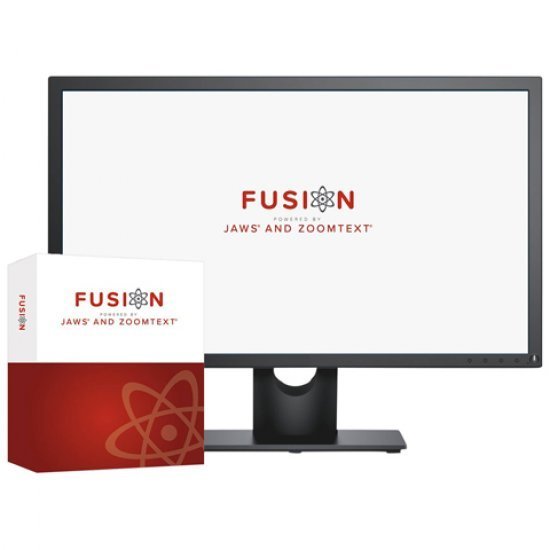
Fusion Pro + SMA
Fusion provides the best of both worlds – ZoomText, with its screen magnification and visual enhancements for screen viewing ease, coupled with the power and speed of JAWS for screen reading functionality.
By blending ZoomText and JAWS together, Fusion has flexible, high quality speech using Eloquence and Vocalizer Expressive, powerful keyboard access, including navigation on the web and a wide range of customisation options.
The Professional Edition is used by schools, businesses and other organisations.
Always include the Software Maintenance Agreement (SMA) to maintain your Perpetual software with access to future updates and upgrades. As the applications used by consumers continue to change, it is critical to maintain your Access Technology License as well.
Fusion is the ultimate accessibility tool for schools, agencies, training centers, and businesses where individuals with vision loss are served. Fusion provides the best of both worlds – ZoomText® , with its screen magnification and visual enhancements for screen viewing ease, coupled with the power and speed of JAWS® for screen reading functionality. A single installer and one license gives you access to both ZoomText and JAWS individually, or together when run as the combined solution – Fusion.
The ultimate accessibility tool
Fusion™ is the ultimate accessibility tool for individuals with any level of vision impairment. Fusion provides the best of both worlds – ZoomText®, with its screen magnification and visual enhancements for screen viewing ease, coupled with the power and speed of JAWS® for screen reading functionality. By blending ZoomText and JAWS together, Fusion has flexible, high-quality speech using Eloquence and Vocalizer Expressive, powerful keyboard access including navigation on the web, and a wide range of customization options. Fusion is the perfect solution for schools, agencies, training centers, and businesses where individuals with vision loss are served. A single installer and one license gives access to both ZoomText and JAWS individually, or together when run as the combined solution – Fusion. Fusion is available in two versions: Professional and Home. A Professional license is used by schools, businesses, and other organizations. The Home version – for non-commercial use – is licensed to individuals for use on their personal computer.
Always include the Software Maintenance Agreement (SMA) to maintain your Perpetual software with access to future updates and upgrades. As the applications used by consumers continue to change, it is critical to maintain your Access Technology License as well.
Flexible Magnification
Full range of magnification levels up to 36x (up to 60x in Windows 8). Levels include: 1x to 8x in steps of 1, 10x to 16x in steps of 2, 20x to 36x in steps of 4, and fractional powers of 1.25x, 1.5x, 1.75x and 2.5x. 30 levels of magnification in ZoomText 10.1: 1x to 2x in steps of 0.2; 2.25x, 2.5x, 2.75x, 3x, 3.5x, 4x, 4.5x, 5x, 6x, 7x, 8x; 10x to 16x in steps of 2; 20x to 36x in steps of 4; 42x, 48x, 54x, and 60x.xFont Magnification
xFont technology displays high-definition text that’s easy to read at all magnification levels. Smooth, bold and condense settings allow you to fine-tune the thickness and spacing of text for added legibility. With other screen magnifiers, the clarity of text is degraded in the magnified view. As a result, many fonts (text characters) are difficult to read, including small fonts, serif and italic fonts, and cursive fonts. With ZoomText’s revolutionary ‘xFont’ technology, you’ll see amazingly clear text at all magnification levels. All types and sizes of text are displayed with high-definition clarity, in all of your applications. Once you’ve seen xFont, no other screen magnifier will do.Automatic Document Reading
ZoomText’s AppReader automatically reads documents, web pages and email within the parent application. ZoomText’s DocReader reads documents in a special environment where text is reformatted for easier viewing. ZoomText offers a variety of tools for quick and easy reading of documents, web pages and email. Each of these tools has unique characteristics that lend themselves to particular reading tasks.AppReader
AppReader reads documents, web pages and email, within the parent application. As you enter and exit AppReader your view of the document does not change, providing quick and seamless transitions between document editing and reading. AppReader can automatically read through the entire document, or you can manually read by word, line, sentence or paragraph. As reading occurs, each spoken word is highlighted. AppReader settings allow you to customize the appearance of word highlighting, including the highlight shape, size, color and transparency level.ZoomText Magnifier Features
Includes all of the features of ZoomText Magnifier| Brand |
|---|
Related Products

JAWS, Job Access With Speech, is the world’s most popular screen reader, developed for computer users whose vision loss prevents them from seeing screen content or navigating with a mouse. JAWS provides speech and Braille output for the most popular computer applications on your PC. You will be able to navigate the Internet, write a document, read an email and create presentations from your office, remote desktop, or from home.
JAWS (Job Access with Speech) is the world’s most popular screen reader, developed for computer users whose vision loss prevents them from seeing screen content or navigating with a mouse. JAWS provides speech and Braille output for the most popular computer applications on your PC.
Home Edition can be used with all 32-bit or 64-bit versions of Windows10, Windows 8, Windows 7, and Windows Vista along with Windows Server 2008 and 2012.

Large Print Computer Keyboard, Wired USB High Contrast Keyboard with Oversized Print Letters for Visually Impaired Low Vision Individuals (Yellow+Black)


ZoomText Magnifier is an advanced screen magnification program that enlarges and enhances everything on the computer screen, making your computer easier to see and use.
Always include the Software Maintenance Agreement (SMA) to maintain your Perpetual software with access to future updates and upgrades. As the applications used by consumers continue to change, it is critical to maintain your License as well.

Designed for anyone who struggles to see the lettering on their keyboard, the ZoomText Large-Print Keyboard makes typing faster and easier than ever before. Each key and button label is easy to see, even in low light, thanks to its 36-point text and choice of high-contrast color schemes: “Black on Yellow” or “White on Black”.

The KEYS-U-SEE Large Print keyboards with white letters on black key and black letters on yellow keys.
Large print keyboard makes typing easier than ever before. Each key and button label is easy to see, even in low light thanks to the 36 point text and choice of high contrast color schemes. The keyboard also provides quick access to ZoomText features.

Duxbury Braille Translation Software (DBT) is known for its easy of use and accurate translation, and is the world-wide leader for text (print) to braille translations, braille editing, formatting, production, publishing and related tasks.
JAWS (Job Access with Speech) is the world’s most popular screen reader, developed for computer users whose vision loss prevents them from seeing screen content or navigating with a mouse. JAWS provides speech and Braille output for the most popular computer applications on your PC.
Home Edition can be used with all 32-bit or 64-bit versions of Windows10, Windows 8, Windows 7, and Windows Vista along with Windows Server 2008 and 2012.
Always include the Software Maintenance Agreement (SMA) to maintain your Perpetual software with access to future updates and upgrades. As the applications used by consumers continue to change, it is critical to maintain your Access Technology License as well.

Designed for anyone who struggles to see the lettering on their keyboard, the ZoomText Large-Print Keyboard makes typing faster and easier than ever before. Each key and button label is easy to see, even in low light, thanks to its 36-point text and choice of high-contrast color schemes: “Black on Yellow” or “White on Black”.
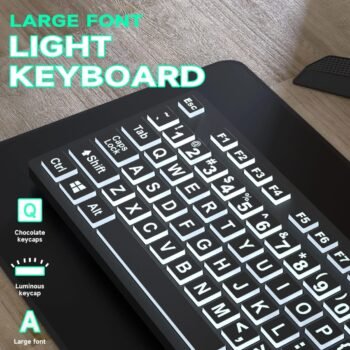
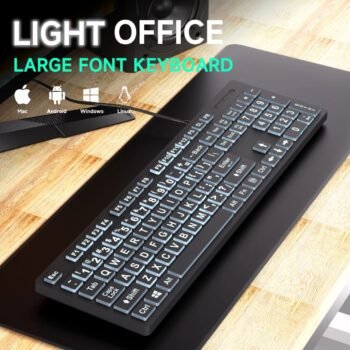
This full-size wired USB keyboard is designed with large, high-contrast lettering to assist visually impaired users. Crafted from 100% new, eco-friendly ABS material, it supports multiple language layouts such as Spanish, Korean, and Japanese. The keyboard features multimedia keys, water drop-shaped keycaps, and a silent keystroke mechanism for a comfortable and quiet typing experience. It meets CE, RoHS, and FCC certifications for safety and regulatory compliance. With a slim, lightweight, and durable build that withstands drops up to 1.2 meters, it offers both dependable performance and portability.

Large Print Computer Keyboard, Wired USB High Contrast Keyboard with Oversized Print Letters for Visually Impaired Low Vision Individuals

Large Print Computer Keyboard, Wired USB High Contrast Keyboard with Oversized Print Letters for Visually Impaired Low Vision Individuals

Large Print Computer Keyboard, Wired USB High Contrast Keyboard with Oversized Print Letters for Visually Impaired Low Vision Individuals
Reviews
There are no reviews yet.