
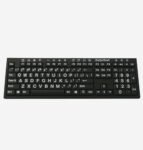

White Print on Black – Large Print Keyboard
$295.00
Designed for anyone who struggles to see the lettering on their keyboard, the ZoomText Large-Print Keyboard makes typing faster and easier than ever before. Each key and button label is easy to see, even in low light, thanks to its 36-point text and choice of high-contrast color schemes: “Black on Yellow” or “White on Black”.
Designed for anyone who struggles to see the lettering on their keyboard, the ZoomText Large-Print Keyboard makes typing faster and easier than ever before. Each key and button label is easy to see, even in low light, thanks to its 36-point text and choice of high-contrast color schemes: “Black on Yellow” or “White on Black”.
The ZoomText Large-Print Keyboard also provides quick access to ZoomText features. The F1 through F12 keys perform double duty. When you press and hold a function key, its assigned ZoomText command is triggered. The commands allow you to instantly start ZoomText, change magnification levels, toggle screen enhancements, launch AppReader and DocReader, and more – all without having to memorize hotkeys.
Related Products

Fusion provides the best of both worlds – ZoomText, with its screen magnification and visual enhancements for screen viewing ease, coupled with the power and speed of JAWS for screen reading functionality.
By blending ZoomText and JAWS together, Fusion has flexible, high quality speech using Eloquence and Vocalizer Expressive, powerful keyboard access, including navigation on the web and a wide range of customisation options.
The Professional Edition is used by schools, businesses and other organisations.
Always include the Software Maintenance Agreement (SMA) to maintain your Perpetual software with access to future updates and upgrades. As the applications used by consumers continue to change, it is critical to maintain your Access Technology License as well.
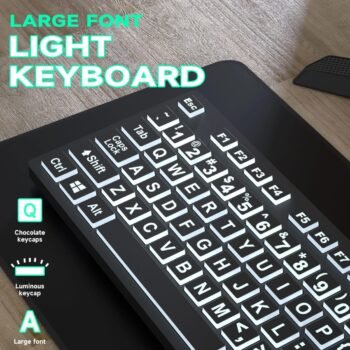
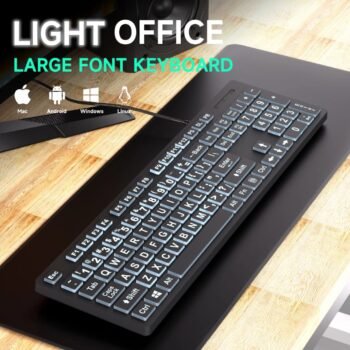
This full-size wired USB keyboard is designed with large, high-contrast lettering to assist visually impaired users. Crafted from 100% new, eco-friendly ABS material, it supports multiple language layouts such as Spanish, Korean, and Japanese. The keyboard features multimedia keys, water drop-shaped keycaps, and a silent keystroke mechanism for a comfortable and quiet typing experience. It meets CE, RoHS, and FCC certifications for safety and regulatory compliance. With a slim, lightweight, and durable build that withstands drops up to 1.2 meters, it offers both dependable performance and portability.

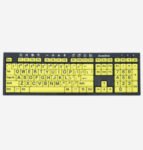
The KEYS-U-SEE Large Print keyboards with white letters on black key and black letters on yellow keys.
Large print keyboard makes typing easier than ever before. Each key and button label is easy to see, even in low light thanks to the 36 point text and choice of high contrast color schemes. The keyboard also provides quick access to ZoomText features.


ZoomText Magnifier is an advanced screen magnification program that enlarges and enhances everything on the computer screen, making your computer easier to see and use.
Always include the Software Maintenance Agreement (SMA) to maintain your Perpetual software with access to future updates and upgrades. As the applications used by consumers continue to change, it is critical to maintain your License as well.

Designed for anyone who struggles to see the lettering on their keyboard, the ZoomText Large-Print Keyboard makes typing faster and easier than ever before. Each key and button label is easy to see, even in low light, thanks to its 36-point text and choice of high-contrast color schemes: “Black on Yellow” or “White on Black”.
Fusion is the ultimate accessibility tool for schools, agencies, training centers, and businesses where individuals with vision loss are served. Fusion provides the best of both worlds – ZoomText® , with its screen magnification and visual enhancements for screen viewing ease, coupled with the power and speed of JAWS® for screen reading functionality. A single installer and one license gives you access to both ZoomText and JAWS individually, or together when run as the combined solution – Fusion.
Always include the Software Maintenance Agreement (SMA) to maintain your Perpetual software with access to future updates and upgrades. As the applications used by consumers continue to change, it is critical to maintain your Access Technology License as well.

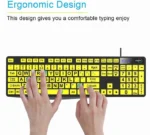
Large Print Computer Keyboard, Wired USB High Contrast Keyboard with Oversized Print Letters for Visually Impaired Low Vision Individuals (Yellow+Black)
SuperNova delivers accessibility through screen magnification, speech and screen reading technology. It makes your organisation’s digital workspace – including Office applications and web browsers – accessible for people who are blind or partially sighted.
A choice between Professional and Enterprise licences enables you to embed accessibility throughout your organisation – whatever its size. SuperNova provides you with the best assistive technology for your employees, your company and budget.

Large Print Computer Keyboard, Wired USB High Contrast Keyboard with Oversized Print Letters for Visually Impaired Low Vision Individuals
Dolphin ScreenReader is fast, reliable screen reading software for people who are blind or severely visually impaired.
ScreenReader can be customised to meet your exact requirements:
- Range of customisable speech settings
- Support for a wide range of braille displays
- Fast, reliable access to Microsoft Office and Windows apps
- Explore the screen with a keyboard or braille display
- Connect a scanner to Scan & Read printed text
- Install on a Windows desktop PC or laptop
- Knowledgeable support from Dolphin accessibility experts

Large Print Computer Keyboard, Wired USB High Contrast Keyboard with Oversized Print Letters for Visually Impaired Low Vision Individuals

JAWS, Job Access With Speech, is the world’s most popular screen reader, developed for computer users whose vision loss prevents them from seeing screen content or navigating with a mouse. JAWS provides speech and Braille output for the most popular computer applications on your PC. You will be able to navigate the Internet, write a document, read an email and create presentations from your office, remote desktop, or from home.
JAWS (Job Access with Speech) is the world’s most popular screen reader, developed for computer users whose vision loss prevents them from seeing screen content or navigating with a mouse. JAWS provides speech and Braille output for the most popular computer applications on your PC.
Always include the Software Maintenance Agreement (SMA) to maintain your Perpetual software with access to future updates and upgrades. As the applications used by consumers continue to change, it is critical to maintain your License as well.
Reviews
There are no reviews yet.