

Dolphin ScreenReader
$3,395.00
Dolphin ScreenReader is fast, reliable screen reading software for people who are blind or severely visually impaired.
ScreenReader can be customised to meet your exact requirements:
- Range of customisable speech settings
- Support for a wide range of braille displays
- Fast, reliable access to Microsoft Office and Windows apps
- Explore the screen with a keyboard or braille display
- Connect a scanner to Scan & Read printed text
- Install on a Windows desktop PC or laptop
- Knowledgeable support from Dolphin accessibility experts
Benefits of Dolphin ScreenReader
Dolphin ScreenReader is assistive technology, designed and developed specifically for people who are blind or severely visually impaired. It gives full accessibility to Windows applications and Microsoft Office.
With ScreenReader, all information on your computer screen is spoken or sent to a connected braille display.
Perfect for people that rely exclusively on speech output, use only braille, or enjoy a blend of both systems. It’s easy to navigate with simple keyboard access.
Meanwhile, your position on screen can be highlighted to enable teachers or sighted colleagues to follow the information visually.
Customise to Read Your Way
Customise Dolphin ScreenReader to meet your exact requirements and preferences.
Use handy shortcut keys or the control panel to choose your preferred voice, ideal reading speed and to specify how much information the speech announces. You can also connect a braille display to read and type with braille.
ScreenReader is flexible so you can switch between speech and braille at any time. Use speech to type documents or read web pages, or switch to braille to work alongside sighted colleagues or deliver presentations with your speaker notes in braille.
Speech Access for Windows
ScreenReader speech reads documents, emails, web pages and other on-screen information in detail. There are Speak Keys that give you further, detailed information about any text or item on the screen.
Multi-task with Sound Splitting and listen to speech through one earphone, and other audio through the other. Or use Audio Ducking to decrease the computer audio volume while the ScreenReader voice is speaking.
ScreenReader reliably speaks characters and words as you type, to aid and increase touch-typing accuracy. You can also read entire documents in one go, and adjust the volume and speed of ScreenReader voices.
Use the Dolphin Cursor to explore web pages and applications with speech. Intelligently navigate through a document or web page to read links, headings, tables, charts, plus advanced style announcements.
Braille Access for Windows
Dolphin ScreenReader enables you to connect a refreshable braille display, so you’re in complete control of how you operate, read and explore your computer screen.
ScreenReader uses your refreshable braille display to accurately present spelling, punctuation and layout, for documents, emails, web pages and more.
This software supports over 60 braille displays, to give you options to choose a display that suits you and your budget.
Related Products
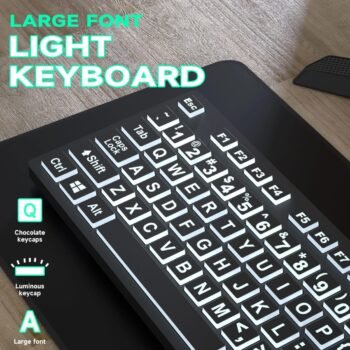
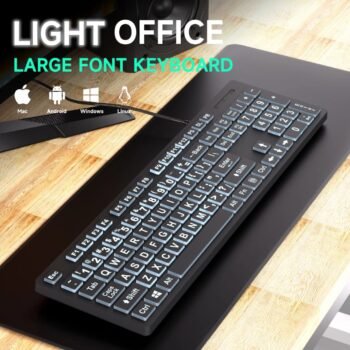
This full-size wired USB keyboard is designed with large, high-contrast lettering to assist visually impaired users. Crafted from 100% new, eco-friendly ABS material, it supports multiple language layouts such as Spanish, Korean, and Japanese. The keyboard features multimedia keys, water drop-shaped keycaps, and a silent keystroke mechanism for a comfortable and quiet typing experience. It meets CE, RoHS, and FCC certifications for safety and regulatory compliance. With a slim, lightweight, and durable build that withstands drops up to 1.2 meters, it offers both dependable performance and portability.

Duxbury Braille Translation Software (DBT) is known for its easy of use and accurate translation, and is the world-wide leader for text (print) to braille translations, braille editing, formatting, production, publishing and related tasks.

Fusion is the ultimate accessibility tool for schools, agencies, training centers, and businesses where individuals with vision loss are served. Fusion provides the best of both worlds – ZoomText® , with its screen magnification and visual enhancements for screen viewing ease, coupled with the power and speed of JAWS® for screen reading functionality. A single installer and one license gives you access to both ZoomText and JAWS individually, or together when run as the combined solution – Fusion.
Always include the Software Maintenance Agreement (SMA) to maintain your Perpetual software with access to future updates and upgrades. As the applications used by consumers continue to change, it is critical to maintain your Access Technology License as well.
SuperNova is a range of assistive technology for people who are blind or partially sighted.
It includes screen magnification, speech and screen reading software with braille support. There are different licences for individuals, educators and businesses, to help make accessibility flexible and affordable.
SuperNova enables people with visual impairments to explore their computer screen and read on-screen information independently.

Designed for anyone who struggles to see the lettering on their keyboard, the ZoomText Large-Print Keyboard makes typing faster and easier than ever before. Each key and button label is easy to see, even in low light, thanks to its 36-point text and choice of high-contrast color schemes: “Black on Yellow” or “White on Black”.

Large Print Computer Keyboard, Wired USB High Contrast Keyboard with Oversized Print Letters for Visually Impaired Low Vision Individuals (Yellow+Black)

Large Print Computer Keyboard, Wired USB High Contrast Keyboard with Oversized Print Letters for Visually Impaired Low Vision Individuals

Designed for anyone who struggles to see the lettering on their keyboard, the ZoomText Large-Print Keyboard makes typing faster and easier than ever before. Each key and button label is easy to see, even in low light, thanks to its 36-point text and choice of high-contrast color schemes: “Black on Yellow” or “White on Black”.
Fusion provides the best of both worlds – ZoomText, with its screen magnification and visual enhancements for screen viewing ease, coupled with the power and speed of JAWS for screen reading functionality.
By blending ZoomText and JAWS together, Fusion has flexible, high quality speech using Eloquence and Vocalizer Expressive, powerful keyboard access, including navigation on the web and a wide range of customisation options.
The Professional Edition is used by schools, businesses and other organisations.
Always include the Software Maintenance Agreement (SMA) to maintain your Perpetual software with access to future updates and upgrades. As the applications used by consumers continue to change, it is critical to maintain your Access Technology License as well.
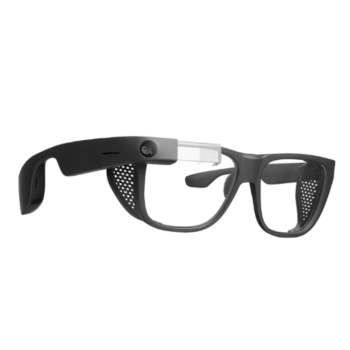
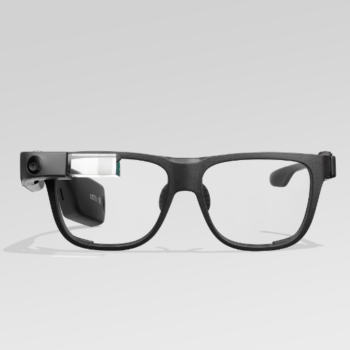
Smith Optics Frame is a designer spectacle frame with zero-power lenses that can be replaced with custom prescription lenses.

Large Print Computer Keyboard, Wired USB High Contrast Keyboard with Oversized Print Letters for Visually Impaired Low Vision Individuals

JAWS, Job Access With Speech, is the world’s most popular screen reader, developed for computer users whose vision loss prevents them from seeing screen content or navigating with a mouse. JAWS provides speech and Braille output for the most popular computer applications on your PC. You will be able to navigate the Internet, write a document, read an email and create presentations from your office, remote desktop, or from home.
JAWS (Job Access with Speech) is the world’s most popular screen reader, developed for computer users whose vision loss prevents them from seeing screen content or navigating with a mouse. JAWS provides speech and Braille output for the most popular computer applications on your PC.
Always include the Software Maintenance Agreement (SMA) to maintain your Perpetual software with access to future updates and upgrades. As the applications used by consumers continue to change, it is critical to maintain your License as well.
Reviews
There are no reviews yet.